A 5-by-5-foot corner is 60 by 60 inches, or 25 square feet. That is enough for a desk and a chair, but not for those two plus a stack of boxes, so the order of your decisions matters. Most advice starts with storage. In a corner this small, start with the three things that cannot be squeezed: the desk depth, the room the chair needs and a walking path that stays open.
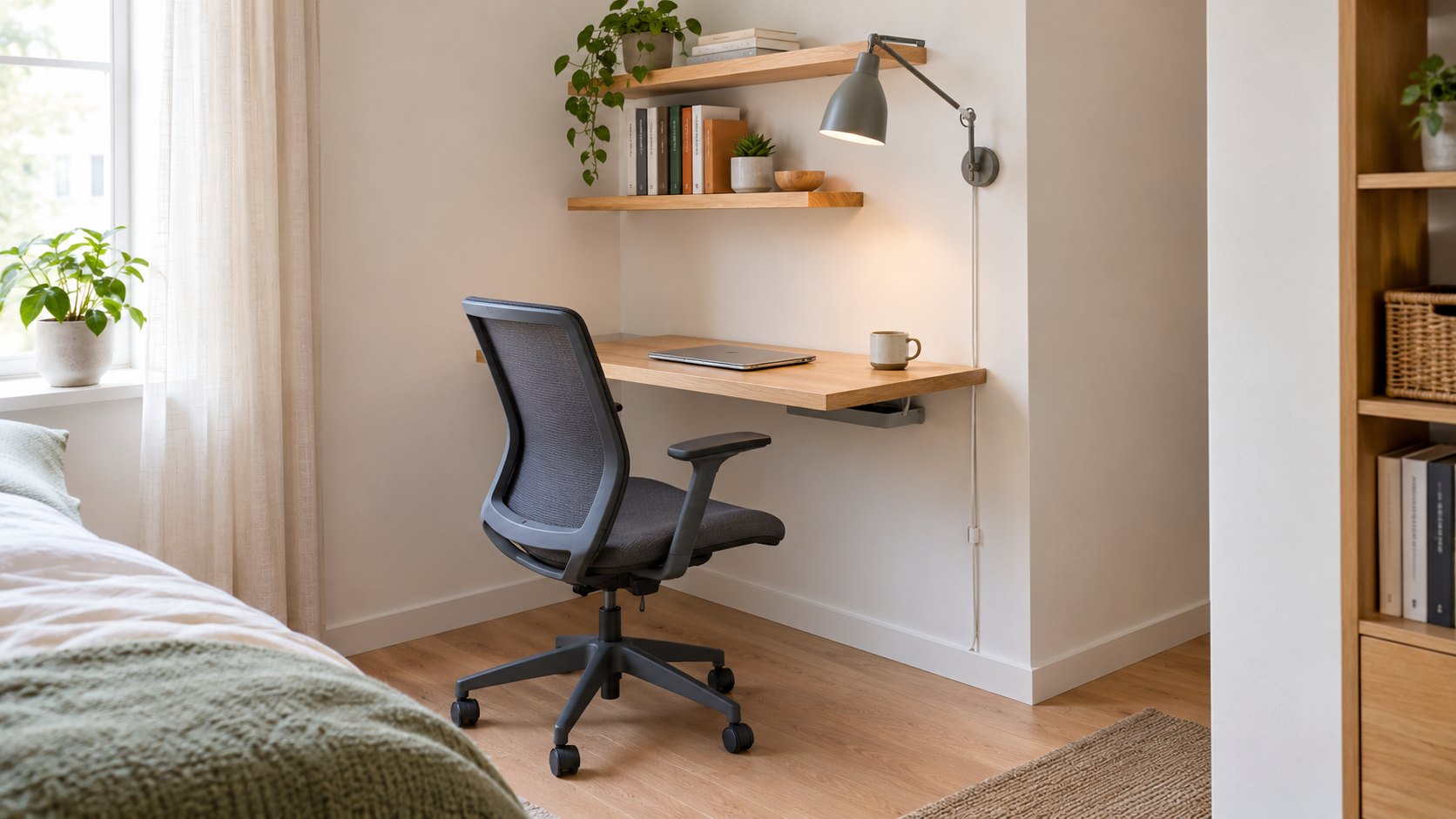
The cover photo shows the result: a wall-mounted desk about 20 inches deep, a slim mesh chair with room to roll back, two shelves, a swing-arm lamp and a single cord clipped down the wall. This guide shows how to plan that layout with a tape measure, set wall zones by reach, decide what earns a place in the corner and route power safely. If your corner shares a room with a bed, our small bedroom floor-first plan covers the rest of the room.
1. Measure the Corner Before You Shop
Write the numbers on a quick sketch:
- The width of both walls and the ceiling height.
- The position and number of outlets, and whether a switch or radiator sits inside the corner.
- Windows, door swings and the baseboard or trim that keeps a desk from sitting flush with the wall.
- How far the corner is from the nearest walkway, bed or sofa.
Then tape the 60-by-60-inch square on the floor. Everything that follows is tested against that square.
2. Choose the Desk Depth First
Desk depth decides how much of the corner is left for the chair. In a 60-inch-deep corner, the arithmetic is simple:
| Desk depth | Left for the chair and path |
|---|---|
| 18 inches | 42 inches |
| 20 inches | 40 inches |
| 24 inches | 36 inches |
Cornell’s ergonomics guidance recommends a flat work surface between 28 and 30 inches above the floor for writing and computer use, which suits most adults. It also notes that a laptop is awkward for long sessions, because when the screen is at a comfortable height the keyboard is not. For sustained work it suggests an external monitor, an external keyboard, or both.
That affects depth. A laptop on its own works on a shallow desk, and 20 inches is a reasonable starting point. If you add a monitor, the same guide puts it at about an arm’s length away, with your eyes level with the top of the screen. Sit back, extend your arm toward the screen and measure before you choose a deeper top. Fold-down and wall-mounted desks save floor space, but fix them to studs or to anchors rated for the load, and ask your landlord first if you rent.
3. Test the Chair and the Walking Path With Tape
Tape a rectangle for the desk along one wall, then sit in your chair and roll back as if you were standing up. Mark where the chair ends up. Most corners fail here, because a chair pushed in looks small and a chair pulled out does not.
Two numbers from the ADA Standards make useful comparisons. They define a clear floor space of at least 30 by 48 inches, and they set the clear width of a walking surface at 36 inches minimum. These rules apply to specific buildings, not to your home, but the numbers are easy to test with tape:
- Tape a 30-by-48-inch rectangle in front of the desk for the chair and your legs.
- With a 20-inch desk, that rectangle runs 68 inches from the wall, which is about 8 inches past the 60-inch square. Check where that overhang lands.
- Tape a 36-inch strip along the nearest walkway and keep it clear.
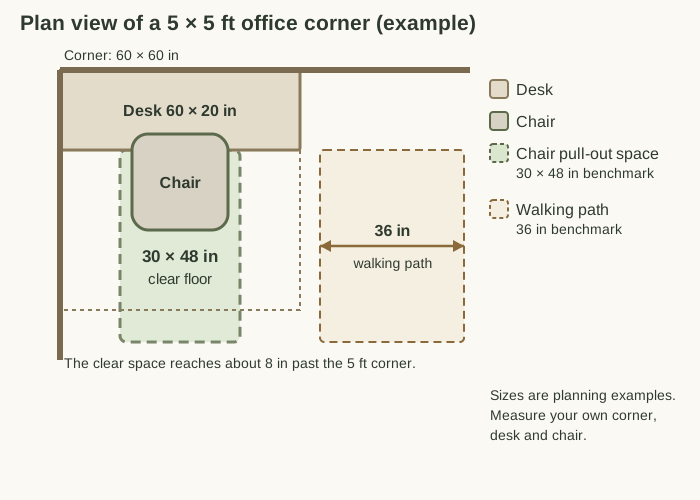
If the overhang blocks a door, shorten the desk, choose a chair without arms or move the desk to the other wall. Do this before you buy storage, because a shelf cannot fix a chair that has nowhere to go.
4. Set Wall Zones by Reach
Once the floor works, use the wall. The ADA guidance gives an unobstructed forward reach range of 15 to 48 inches above the floor, and it makes a practical guide for sorting items by height:
- Below 15 inches: heavy or rarely used items, such as a printer or a box of paper.
- 15 to 48 inches: the daily zone. The desk surface, keyboard, notebook, charger and the one shelf you reach every day belong here.
- Above 48 inches: light items you use occasionally, with a step stool for access.
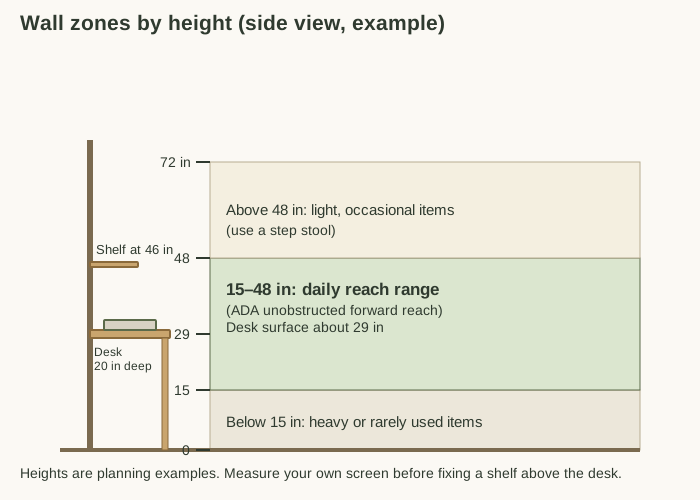
In the example, the desk surface sits at about 29 inches and a shelf at 46 inches. Measure your own screen before you fix a shelf above the desk, because a desktop monitor is much taller than a laptop. If the shelf would sit behind the top of the screen, place it beside the monitor or raise it and keep only light items there. Put heavy items on the lowest surface and fix shelves into studs or use anchors rated for the load.
5. Give Every Item a Decision
A 25-square-foot corner cannot hold things you might need someday. Sort what is on the desk into three piles:
- Use here: items you touch most weeks, such as a laptop, notebook, charger and headphones.
- Store elsewhere: backup supplies, old files and spare cables, which go in a labeled box in a closet or another room.
- Remove: dead pens, duplicate cables, old receipts and anything you have not used in a year.
Keep one tray for incoming paper and one drawer or box for supplies. When something does not have a home, the corner is full. Our 350 square foot apartment guide shows how to place the stored-elsewhere items in a studio, and the DIY pull-out guide covers low bins.
6. Plan the Cable Path and Power
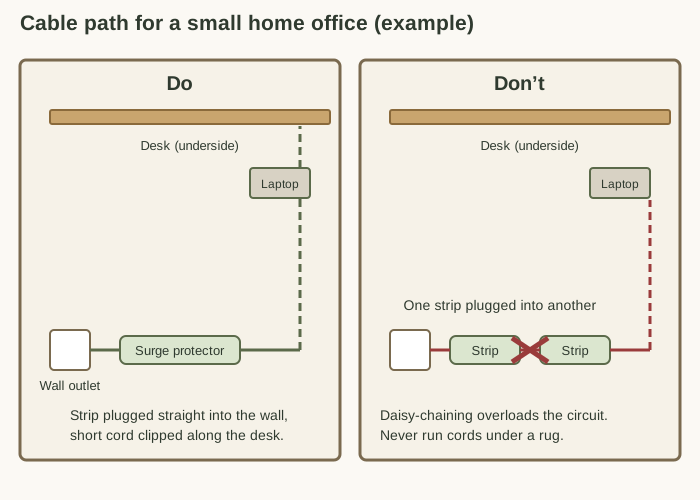
Cables are the fastest way to make a tidy corner look messy, and they are also the one part of the plan with a safety side. The electrical safety guidance from St. Olaf College gives a short list worth following:
- Do not plug power strips or extension cords into one another, which is called daisy-chaining and can overload the circuit.
- Plug each power strip directly into a wall outlet.
- Use the shortest cord possible for the task.
- Do not run cords under carpets or rugs, and cover any cord that must cross a walkway.
- Keep high-power appliances, such as space heaters, off power strips.
- Check cords and strips periodically for cuts, frays or other damage.
The same guidance allows cords to be attached to the underside of tables and to walls, so a few adhesive clips and a small cable tray under the desk are enough. Label each cord at the plug end so you can find it later.
7. Light the Desk and Give Your Eyes a Break
A wall-mounted swing-arm lamp, as in the cover photo, lights the desk without using floor or desk space. If you can, place the screen beside a window rather than directly in front of or behind it, so daylight does not wash out the display.
Cornell’s guide also recommends a short eye break every 15 minutes, looking at something more than 20 feet away for a minute or two. A window beside the corner makes that break easy.
8. Common Mistakes in a Tiny Office Corner
- Buying the desk before taping it. A desk that is 4 inches too deep can take away the chair’s room.
- Letting the chair overhang the walkway. Test pulling out the chair, not just pushing it in.
- Fixing a shelf at the wrong height. Measure the screen first.
- Daisy-chaining power strips. Run one strip directly into the wall.
- Using the bed or floor as overflow. A pile that has no home means the corner holds too much.
- Keeping everything in one drawer. Separate daily items from backups.
9. A Two-Minute Reset and a Monthly Check
At the end of each workday, spend two minutes returning items to their places, clearing the desk surface and putting loose paper in the tray. Once a month, check the cords and strip for damage, empty the paper tray, and tape the 30-by-48-inch rectangle again to see whether the chair still has room.
10. Try This Weekend
Tape the 60-by-60-inch square, the desk rectangle and the 30-by-48-inch chair space on the floor. Live with the tape for three days. If you trip over it, move a line. Then choose a desk and shelves that fit the tape, not the other way around.
Frequently Asked Questions
How deep should a desk be in a 5-by-5-foot corner?
A 60-inch-wide desk that is 20 inches deep leaves 40 inches of the corner for the chair, which is a workable starting point for a laptop. If you add an external monitor, Cornell’s ergonomics guide suggests placing it about an arm’s length away, so test with the real screen before you buy a deeper top. Keep the work surface 28 to 30 inches above the floor, the range the guide gives for most adults.
How much floor space do I need to pull out the chair?
There is no fixed rule for a home. As a comparison number, the ADA Standards define a clear floor space of at least 30 by 48 inches. Tape that rectangle in front of the desk: with a 20-inch desk it reaches about 8 inches past the 5-foot corner, so make sure that overhang does not land in a doorway or the main path.
How wide should the walking path be next to a small office corner?
The ADA Standards use 36 inches as the minimum clear width of a walking surface. They apply to specific buildings, not to your home, but 36 inches is a good comparison for the path beside the corner. If a path is narrower, move the desk or choose a smaller chair before you add shelves.
Where should I store things in a 5-by-5 office corner?
Keep daily items between 15 and 48 inches above the floor, the unobstructed forward reach range in the ADA guidance. Put heavy or rarely used items below it, light occasional items above it, and move backup supplies to another room so the corner holds only what you use each week.
Can I use a power strip in a small home office corner?
Yes, if it is plugged directly into a wall outlet and not into another power strip or an extension cord. St. Olaf College’s electrical safety guidance also advises using the shortest cord that works, checking cords for cuts and fraying, and keeping heaters and other high-power appliances off power strips.
How do I keep the corner from getting cluttered again?
Give every item a decision: use here, store elsewhere or remove. Keep one tray for incoming paper, one drawer for supplies, and finish each workday with a two-minute reset that returns everything to its place.
Sources
- Cornell University Ergonomics Web, Ergonomic Guidelines for arranging a Computer Workstation : a work surface 28 to 30 inches above the floor, an external monitor and keyboard for sustained laptop use, eyes level with the top of the screen at about an arm’s length, elbow angle of at least 90 degrees and an eye break every 15 minutes.
- US Access Board, ADA Standards for Accessible Design : clear floor space of at least 30 by 48 inches (305.3) and a walking surface clear width of at least 36 inches (403.5.1).
- US Access Board, ADA Chapter 3: Operable Parts : the 15 to 48 inch unobstructed forward reach range.
- St. Olaf College Environmental Health and Safety, Electrical Safety : no daisy-chaining, plugging strips directly into outlets, the shortest cord possible, no cords under floor coverings and keeping high-power appliances off power strips.
The diagrams are original illustrations made for this guide. The ADA Standards apply to specific buildings, not to private homes, and are used here only as comparison numbers. Sizes and heights are planning examples, so measure your own corner and follow the manufacturer’s instructions for furniture, anchors and electrical equipment.
Image Credits
- Cover: AI-generated image via ChatGPT, October 2026.